
Hosted Nuclei Vulnerability Scans with Panoptic Scans Written on . Posted in How-To.

How to Use Hosted Nuclei Scans for SOC 2 Compliance
SOC 2 audits have a way of creeping up on SaaS teams. You know you need one to close enterprise deals, and you know your auditor is going to ask about vulnerability management. The question is always the same: "How do you identify and manage vulnerabilities?" You need a good answer for that.
SOC 2 doesn't require any particular tool, but it does require a real process for finding security issues on an ongoing basis. Vulnerability scanning covers that requirement well, and Nuclei is one of the best open-source scanners out there for the job. The catch? Running it yourself means maintaining infrastructure, keeping templates updated, and wrangling scan results into something your auditor can actually use.
We built Panoptic Scans to take that work off your plate. You get Nuclei scanning, fully hosted and scheduled, with results formatted for audit evidence. Here's how to set it up.
A Quick Primer on Nuclei
Nuclei works by running a library of community-maintained "templates" against your targets. Each template checks for a specific vulnerability, misconfiguration, or security flaw. The template library is huge and gets updated constantly as new CVEs come out. For SaaS companies, this means your scans stay current with real-world threats without you having to do anything.
Getting Started: Set Up Audit-Ready Scanning in Minutes
The whole point of hosted scanning is that you shouldn't need to involve your engineering team. Here's the setup process.
Step 1: Add Your Targets
Start by telling us what needs scanning. For SOC 2, you'll typically want to cover your main web application, any public APIs, and other internet-facing infrastructure.
- Log in to your Panoptic Scans dashboard.
- Navigate to the "Targets" section.
- Click "Add Target" set the scan type to Nuclei, and enter the domain or IP address.
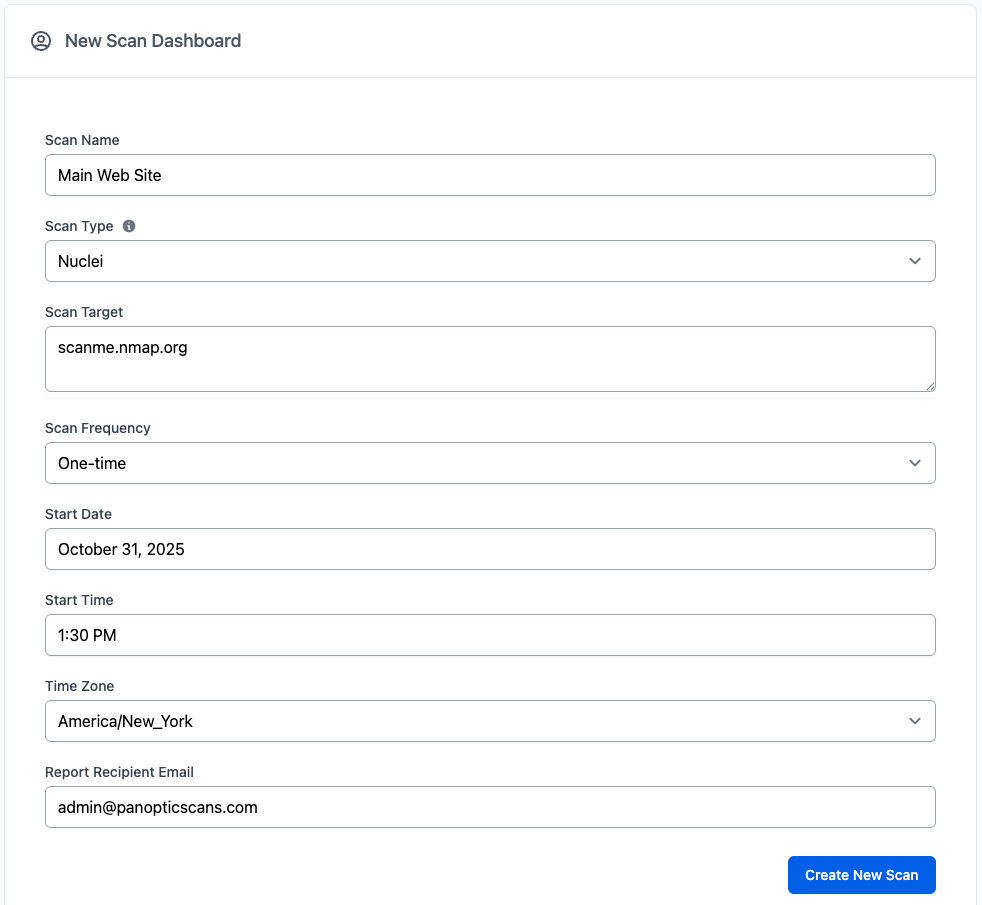
Adding your key application as a target takes seconds.
Step 2: Schedule Recurring Scans
Auditors want to see that scanning is happening regularly, not just once before the audit. Setting up a recurring schedule is the easiest way to demonstrate that.
- Go to the "Scans" section and click on the Edit Scan button in the Actions column.
- Check your target and choose the "Nuclei Vulnerability Scanner."
- Set a recurring schedule. Weekly is a reasonable starting point for most teams.
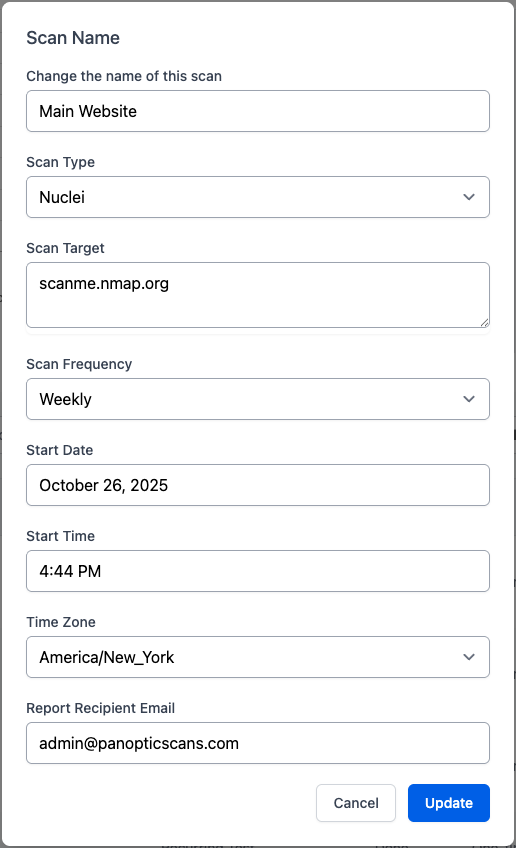
Schedule weekly or monthly Nuclei scans to ensure continuous compliance.
Step 3: Run the Scan
Click "Launch Scan." From here, Panoptic Scans handles execution, template updates, and result processing. No servers on your end, nothing to patch or maintain.
Reading Your Results
Raw scan output isn't useful to an auditor. What they want to see is that you can identify issues, understand their severity, and track remediation. Here's what Panoptic Scans gives you.
The Vulnerabilities Dashboard
After a scan completes, the dashboard groups findings by severity so you can see what needs attention first. This view is useful both for your team's day-to-day prioritization and for showing auditors that you have a triage process.
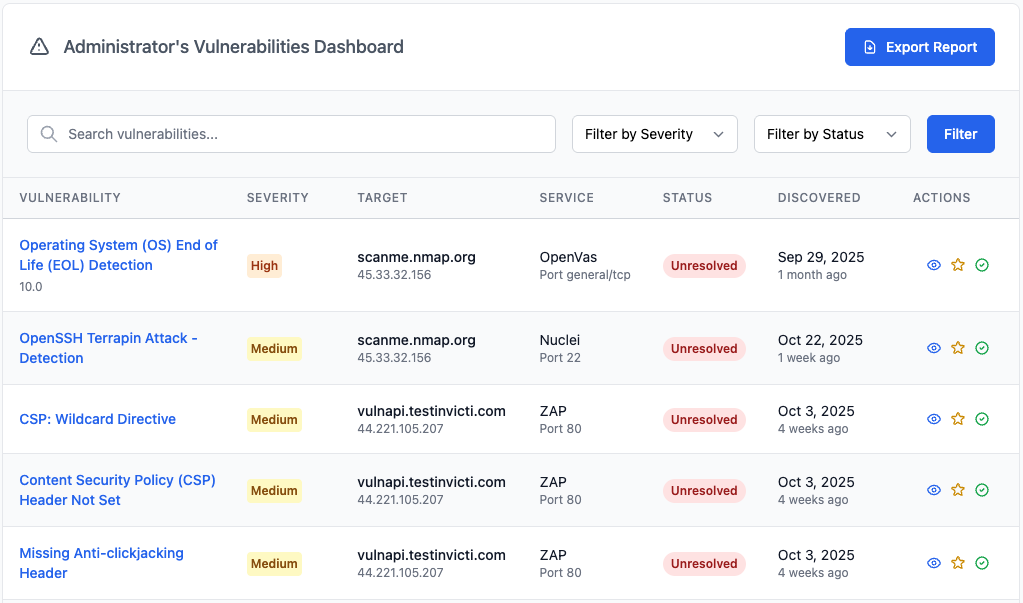
The dashboard gives you a risk-based overview for easy reporting.
Individual Vulnerability Details
Clicking into a specific vulnerability shows you which assets are affected and what to do about it. Each finding includes:
- Description: What the vulnerability is and why it matters.
- Severity: A rating so you know where to focus first.
- Affected systems: Every target where this issue was found.
- Remediation steps: Specific guidance your team can act on.
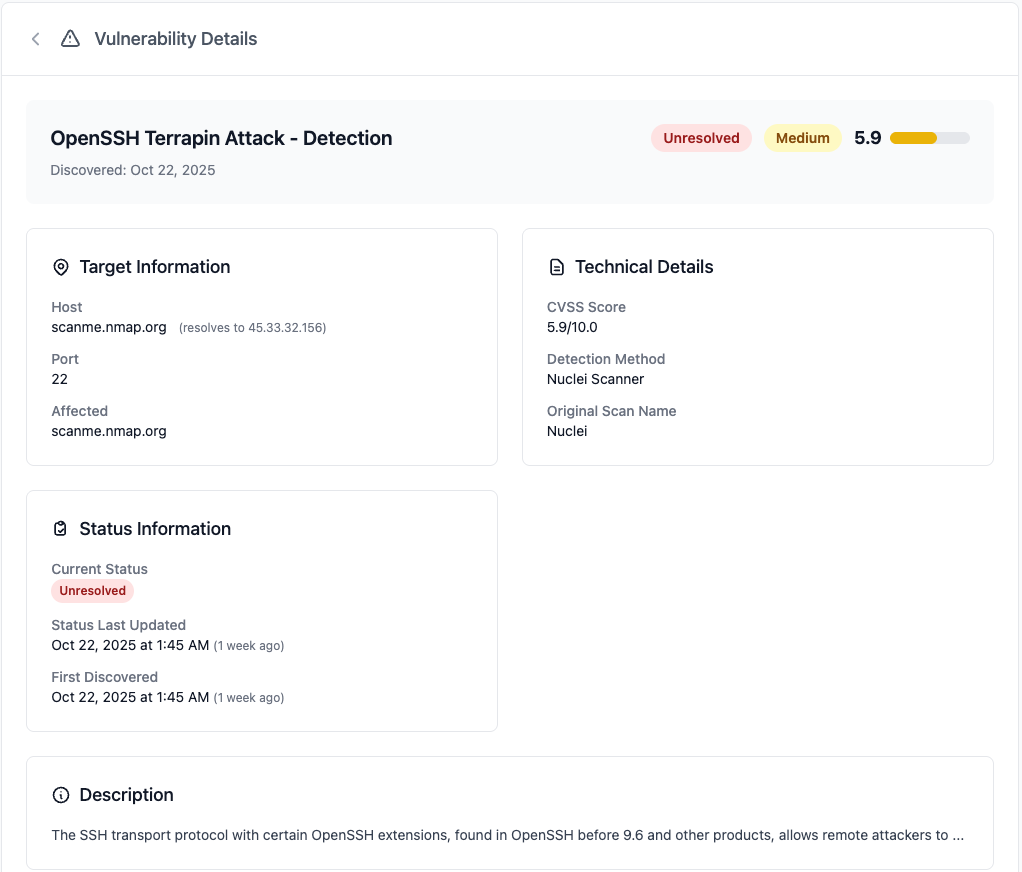
Export vulnerability details to share with your team or your auditor.
Why Hosted Scanning Makes Sense for SOC 2
You could run Nuclei yourself. Plenty of security teams do. But if you're a SaaS company going through SOC 2 for the first time (or the fifth time), there are practical reasons to use a hosted option:
- Audit evidence is already formatted. You won't spend hours turning CLI output into something presentable. The scan history and vulnerability records are ready to hand over.
- Your engineers stay focused on the product. Managing scan infrastructure is real work. Offloading it means fewer context switches for your dev team.
- Scanning actually happens on schedule. Automated scheduling means you won't end up with a gap in your scan history because someone forgot to run it last month.
Get Scanning Before Your Next Audit
If vulnerability management is still a loose end in your SOC 2 preparation, this is a straightforward way to close it. Set up Nuclei scans now, let them run on a schedule, and by the time your auditor asks about vulnerability detection, you'll have months of evidence ready.
Sign up for Panoptic Scans and get your first scan running in a few minutes.